The customer portal
Your renters get their own pages, so they can look things up without ringing you: where their deposit stands, what they signed, what an inspection recorded, and what they owe.
There is nothing to switch on. Every customer has these pages from the moment they have a booking with you.
How your customer gets in
There is no password to hand out. Your customer asks for a one-time sign-in link, which is emailed to them and works for 30 minutes.
That is deliberate: people rent from you twice a year, and a password they set in April is forgotten by September. A link in their inbox always works.
What you should do: put a link to these pages where your customers already look, in your booking confirmation, or as a "My bookings" link in your website footer. Ask support for the exact address for your account; it lives on the same ReservationBay address your booking widget uses.
A few things worth knowing when a customer calls about it:
- Asking for a new link cancels the previous one. So if they clicked an old email, tell them to request a fresh link.
- A link works once. Forwarding it to a partner does not give the partner a second key.
- The form gives the same answer whether or not the address is known, so nobody can use it to find out who rents where. That also means a customer who typed the wrong address gets no error. They simply get no mail.
- Requests are rate limited, so someone hammering the button will be asked to wait.
One address, two rental companies
If someone rents from two businesses that both use ReservationBay, each sends its own link, and each email names the company it opens. Their bookings with you are never mixed with anyone else's.
What they can see
| Page | What is on it |
|---|---|
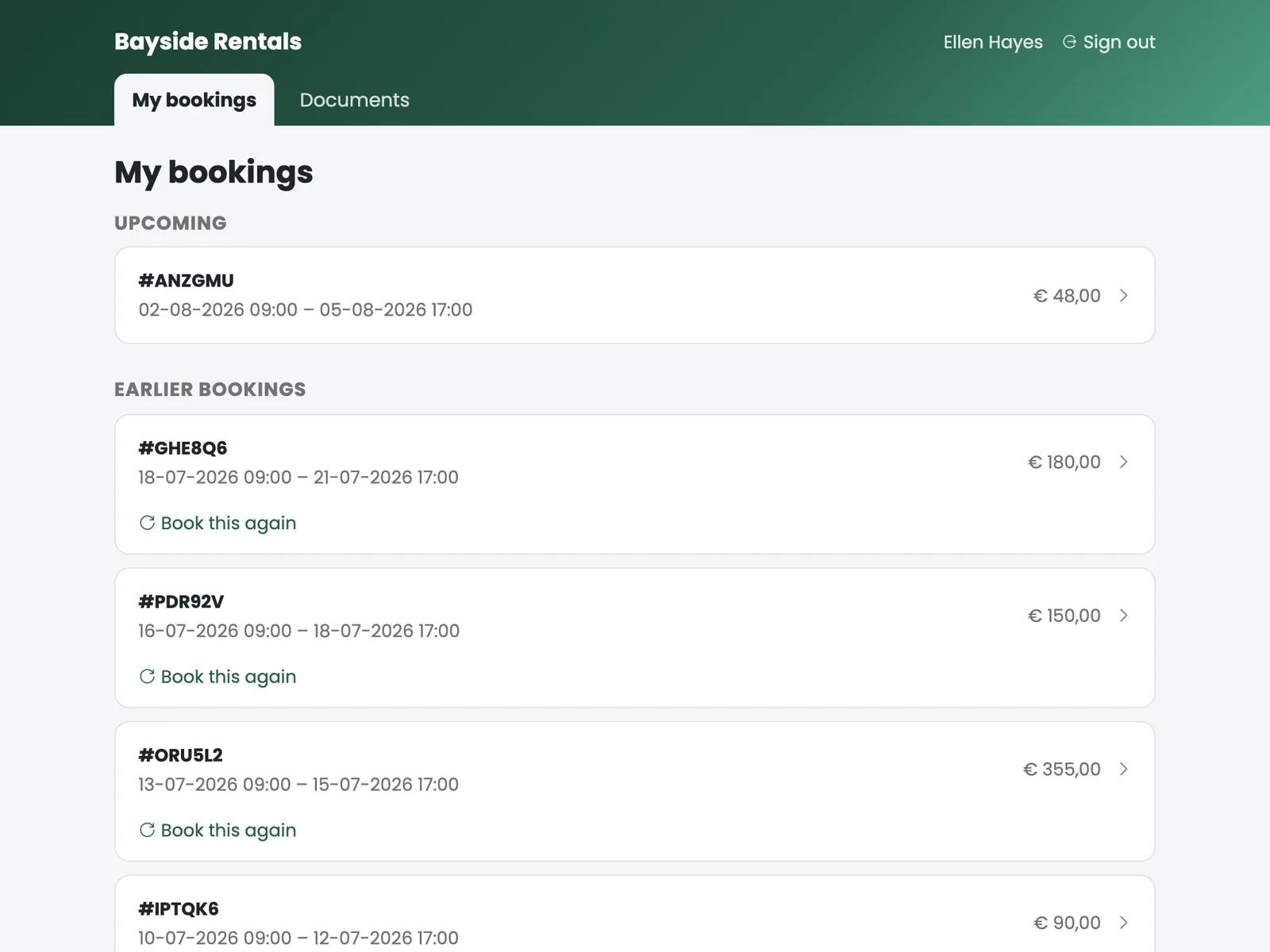
| Bookings | Split into upcoming and history. |
| One booking | The rental in full: lines, the objects that went out, the size each one was, the extras they added, the totals and the location. |
| Documents | What they signed. The signed PDF where there is one; otherwise the contract as it was worded when they booked, generated on demand. |
| Inspection | The inspection file including its photos: what was noted at handover and at return. |
| Deposit | Where their deposit stands and on what grounds anything was withheld. |
| Invoice | An invoice per rental, on screen and as a branded PDF. |
Everything is in your branding, with your logo and your details.
What you control
These pages have no settings of their own. They show what your portal already holds. Which means the way to change what a customer sees is to change it where it lives:
| What the customer sees | Where you set it |
|---|---|
| The logo and company details on their invoice and documents | Settings → General |
| The wording of the contract they can download | Document templates |
| Whether there is a signed PDF at all | Sign the contract on the booking |
| Whether they see inspection photos | Record a handover or return inspection |
| The grounds shown for a withheld deposit | The damage description on the return inspection. Write it as something a customer should read |
| The language they get by default | Settings → General |
The practical consequence: what you type into an inspection is customer-facing. "Scratch" and "Deep scratch across the left panel, photographed, € 40 withheld" are the same field, and one of them prevents a phone call.
Paying an outstanding amount
If something is still owed on a booking, they can pay it from their own booking page, through the same checkout as the widget. That saves the phone call and saves your team taking card details over the phone.
Re-booking
Re-book repeats a previous rental on new dates: the same location, objects, bundles and extras, without their having to remember what they had.
The new booking arrives in your list unconfirmed, with the customer portal as its source, exactly like a widget booking. You confirm it as usual.
For a business with returning customers this is quietly one of the most useful things on the whole site.
Their own language
They choose it themselves with the switcher at the bottom of the page. Until they do, your company language is used. Set that under Settings → General.
Their choice then also drives everything you send them by email, which is the useful part: a German customer who switches once gets German confirmations from then on, without your doing anything.
What they cannot see
Only their own records, at your company. Other customers, your other bookings and your reports are simply not reachable.
The same applies across companies: if one of your customers also rents from another ReservationBay business, the two accounts never meet. Their history with you is yours alone.
Documents and inspection photos are served through short-lived links, so a link a customer forwards stops working shortly afterwards.
Is it worth pointing customers at?
Yes. If you take deposits or sign contracts, those are the two things people ring up about, and both are answered here without your team picking up.
It also pays for itself if you have returning customers, because of the re-book button.
If you rent bikes by the hour for cash and sign nothing, there is little on these pages for your customers and you can leave it alone.